
Animation Tab
Contents
- Parameter Controls
- Display Mode for Pan and Zoom
- The Centre Control
- The Rotate Control
- Changing Parameters with the Mouse
- Keyboard Entry
- The Right Click Menus for X, Y and Z
- Framing
- Opacity and Blur
- Modifiers
- Smooth Move
- Pan X; PanY; Pan Z
- Colour Correction
- Levels
- Brightness / Contrast
- Hue / Saturation
- Toning
- Colouration
- Negative
- Key-frame Time
- Colour Correction
- Levels
- Brightness / Contrast
- Hue / Saturation
- Toning
- Colouration
- Negative
- Key-frame Time
The Animation Tab is shown below.This provides the various adjustments and parameters to control animation of objects.
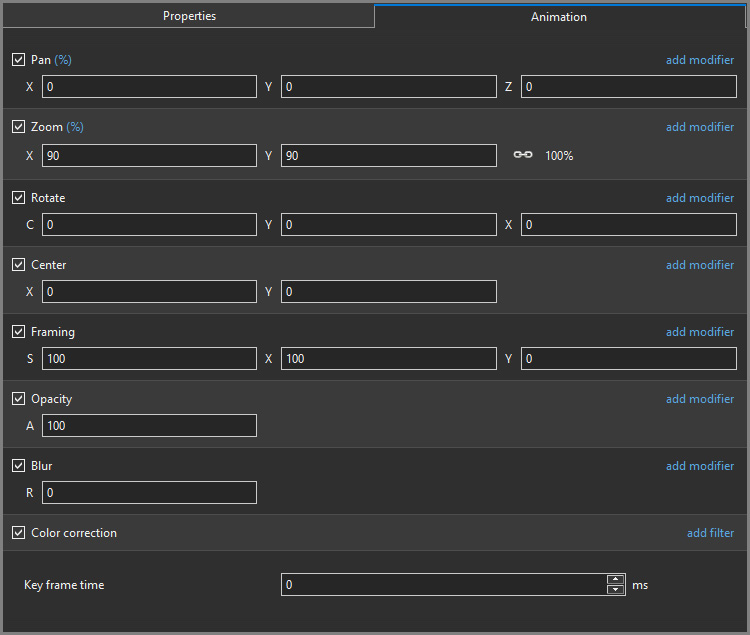
- For Pan and Rotate, adjustments can be made in three planes
- X,Y and Z for Pan
- C,Y and X for Rotate
- These adjustments replace the 3D parameters provided in Version 8.
- A new adjustment called Framing is provided (see Framing)
- The Color Correction parameters have been expanded in Version 9 (Color Correction)
- The "Key Frame Time" box shows the time (in milliseconds) of the selected Key Frame
Parameter Controls
Display Mode for Pan and Zoom
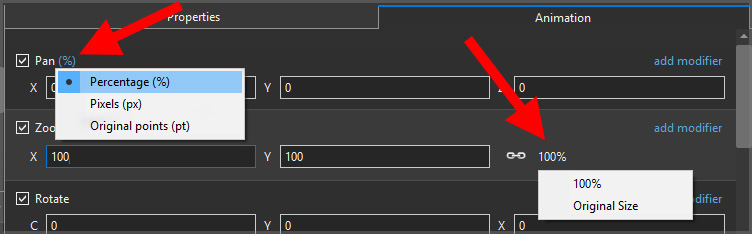
Click on the "%" sign or the "100%" sign:
- "%" = Percentage Mode
- "px" = Pixels Mode
- "pt" = Original Points Mode
- "100%" = Full Height of Project Screen
- "Original Pixels" = The Original Pixel Size of the Image
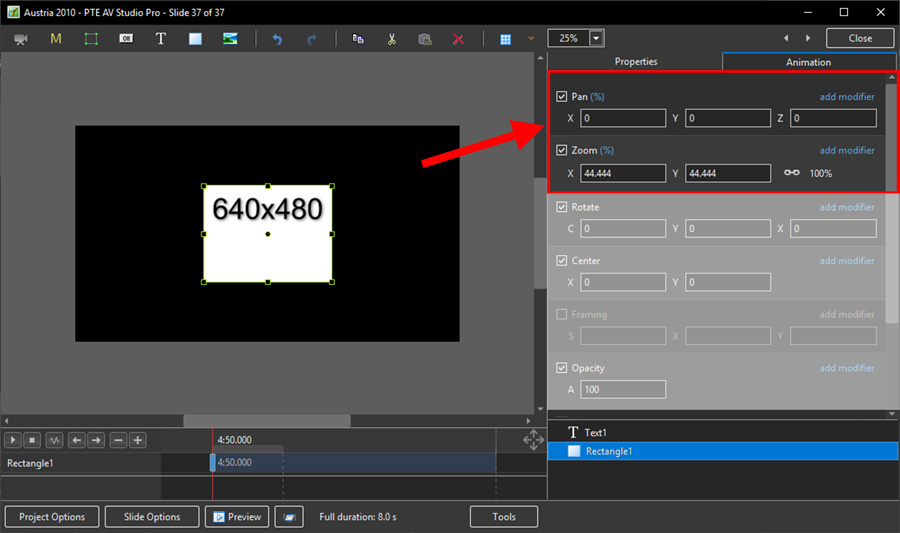
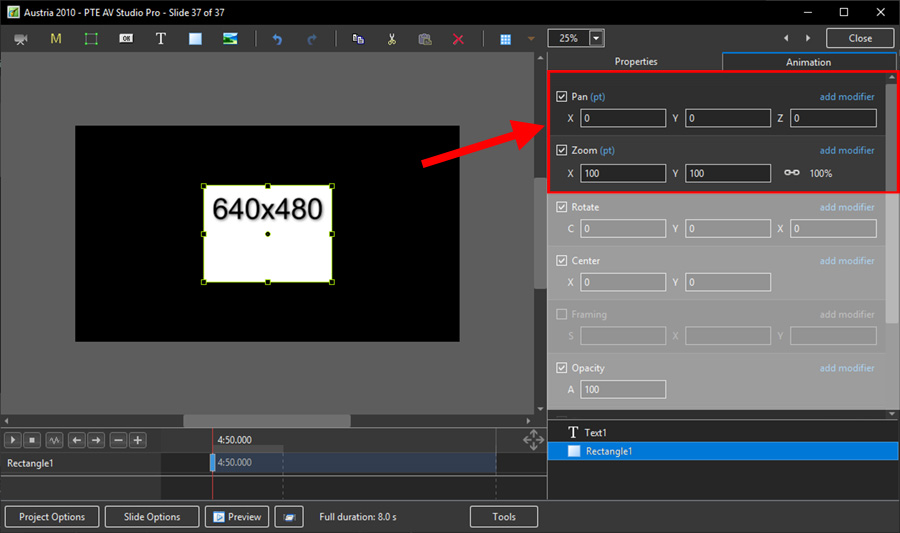
The Illustration below shows a 640×480 rectangle at Original Size in a 1920×1080 Project
- In Percentage Mode:
- The values for "X" and "Y" Pan are calculated for the Centre of the Object/Rectangle with respect to the Centre of the Slide
- The value of the Zoom Parameter is the percentage of the Full Height of the Project Screen (in this case 1080 pixels)
- 480/1080= 0.44444444444 = 44.44444444%
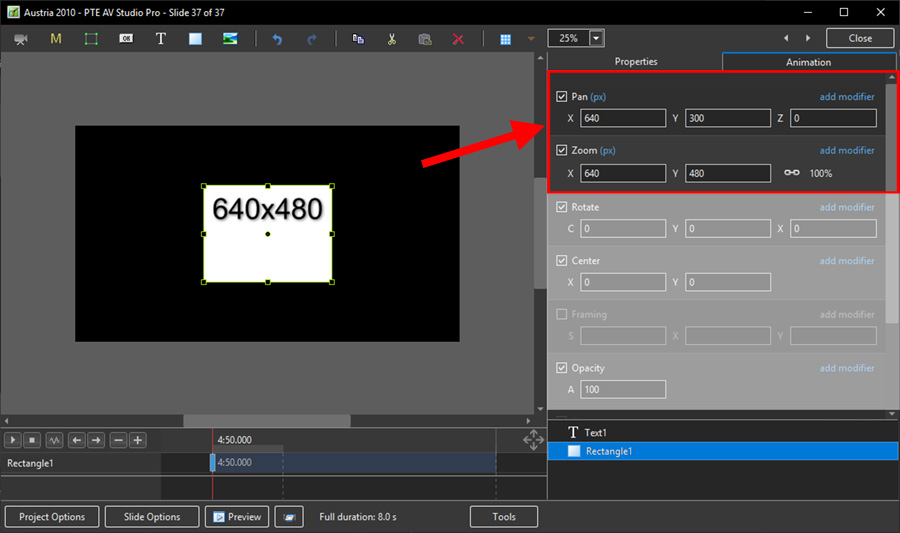
- In Pixels Mode:
- The values for "X" and "Y" Pan are calculated for the Top Left Corner of the Object/Rectangle with respect to the Top Left Corner of the Slide
- The value of the Zoom Parameter is the Pixel Size of the Object/Rectangle
- In Points Mode
The Centre Control
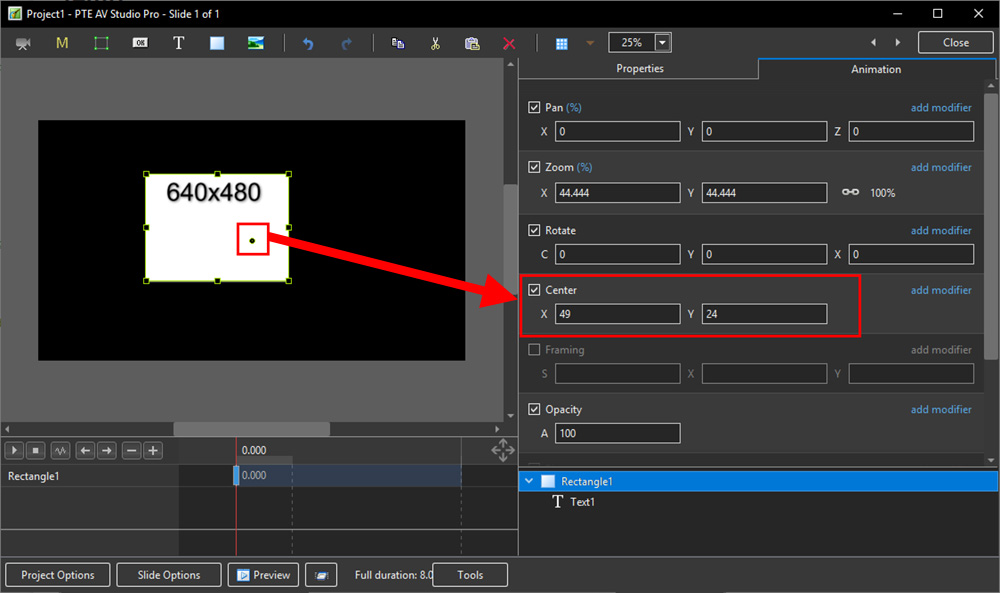
- The "CENTRE" Control can be used to move the CENTRE or "Point of Rotation" of an Object as shown below:
The Rotate Control
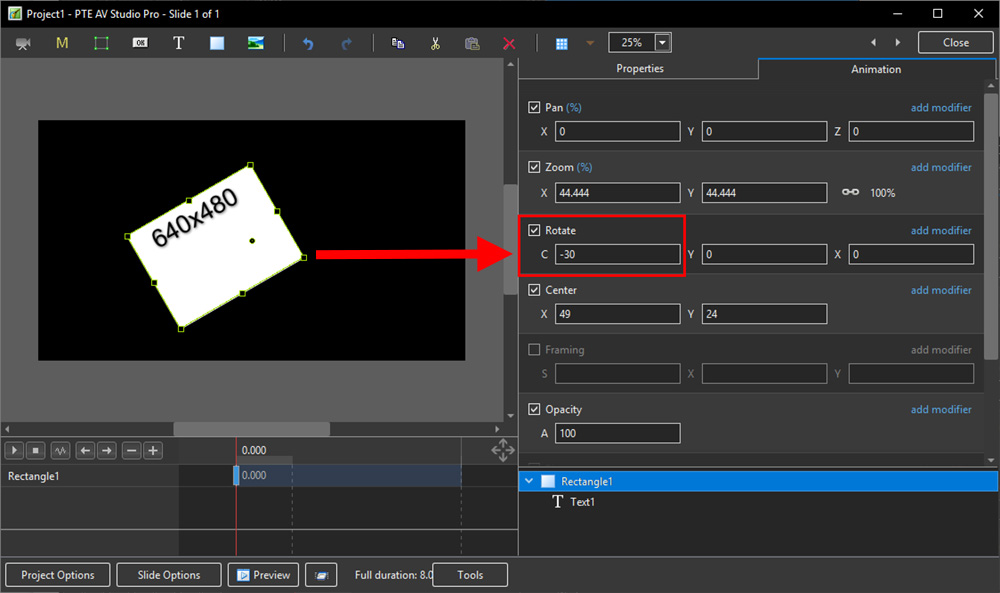
- The "Rotate C" Control will rotate an Object about its Centre Point in the same plane as the screen:
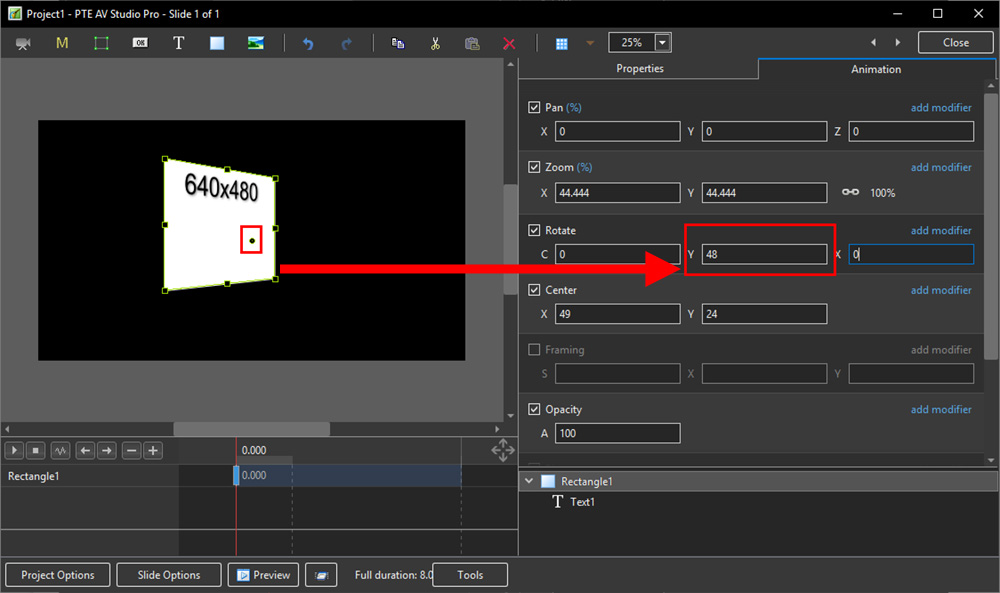
- The "Rotate Y" Control will rotate an Object about its Centre Point in 3 Dimensions Horizontally:
- The "Rotate X" Control will rotate an Object about its Centre Point in 3 Dimensions Vertically:
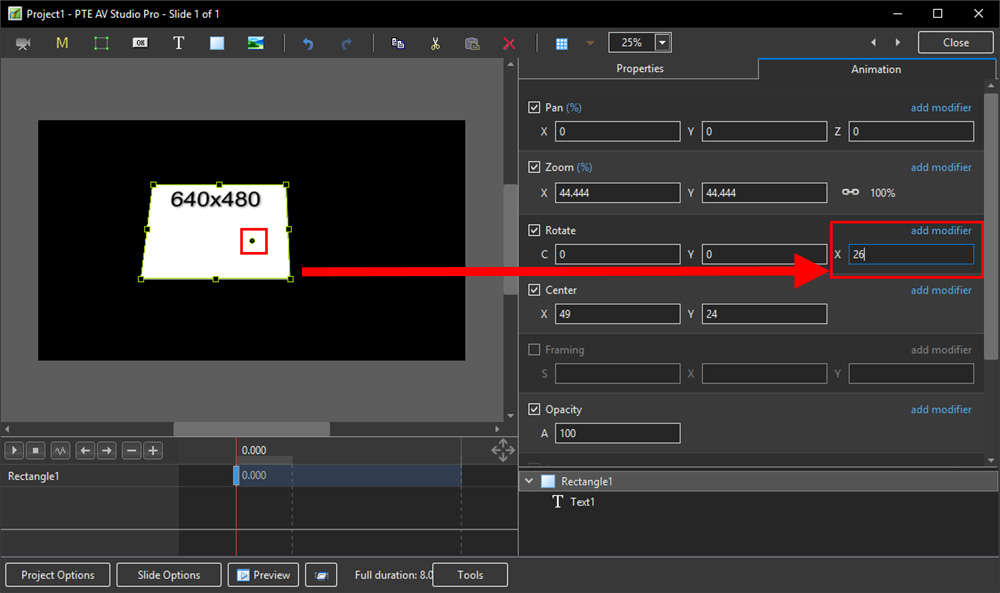
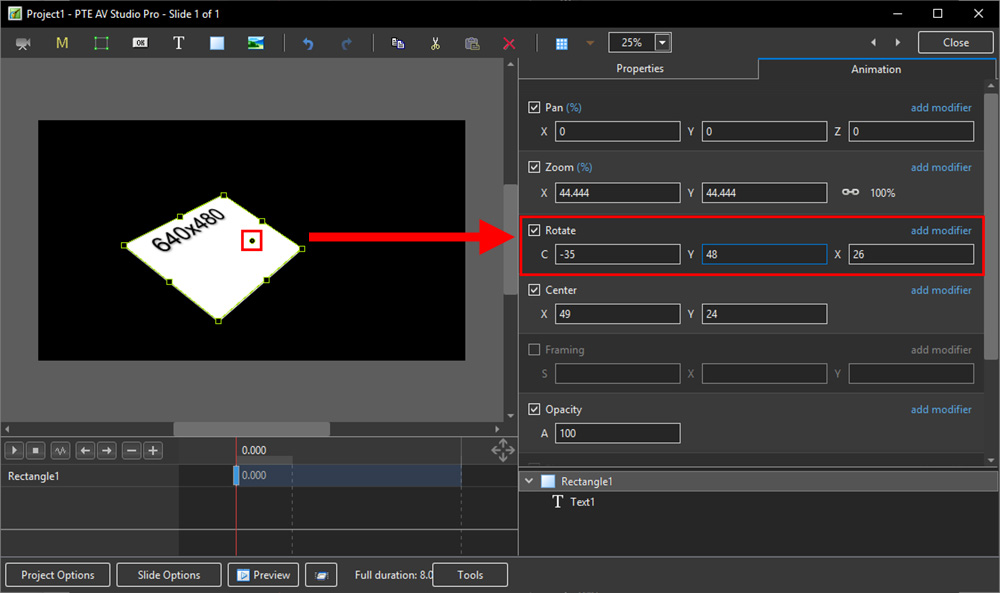
- The "C", "Y" and "X" Rotate Controls can be used simultaneously:
Changing Parameters with the Mouse
- Place the Mouse on any Letter (e.g. X,Y or Z in the Pan Controls) and click and drag left or Right
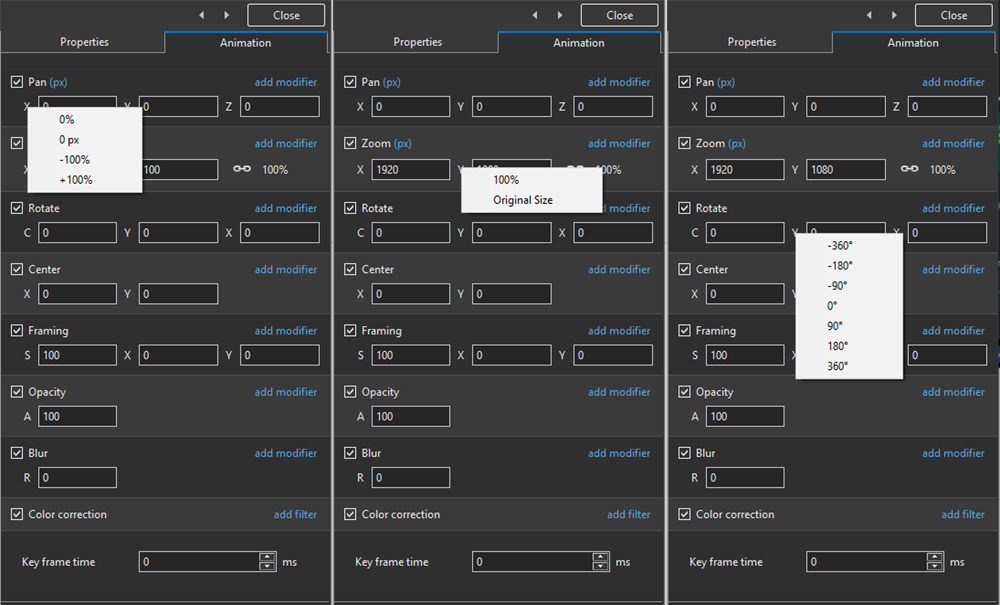
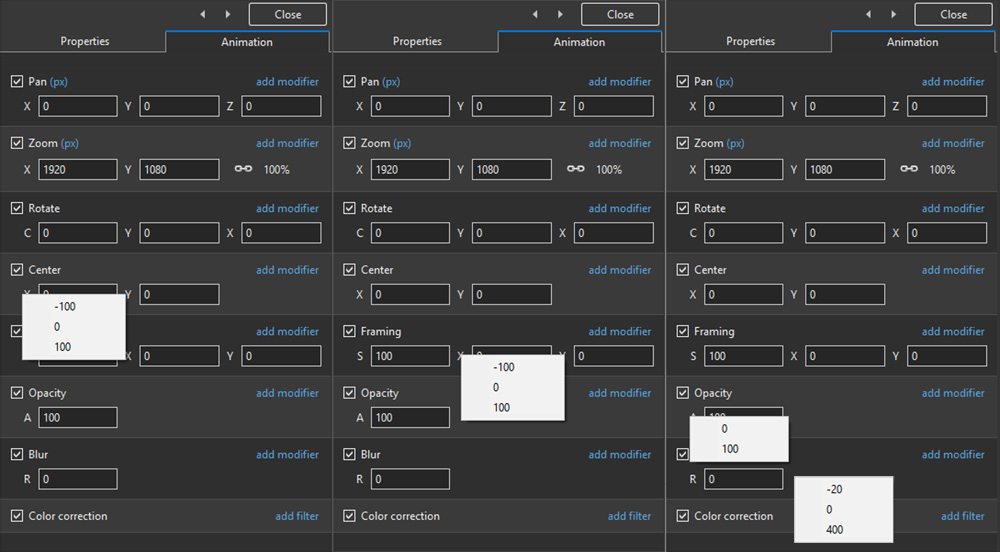
- You can also Right Click on any Letter and access commonly used Preset Values (See Right Click Menus below)
- You can "double click" on any letter to change the value back to its default state
Keyboard Entry
- In any box, highlight the existing value and type in a new value
OR Place the cursor in a box and:
- UP arrow on Keyboard increases the value by one unit
- DOWN arrow decreases the value by one unit
- Pg Up on Keyboard increases the value by ten units
- Pg Dn on Keyboard decreases the value by ten units
The UNITS depend on the chosen Display Mode:
- In % Mode the units will increase/decrease by 1% or 10% of the Parent Frame (or Background)
- In Px Mode the units will increase/decrease by 1 Pixel or 10 Pixels - relative to Project Size
- In Pt Mode the units will increase/decrease by 1 Pixel or 10 Pixels relative to the Original size of the Object
Pan
- The parameters can be read in Percentage, Pixels or Original Points
- X - Horizontal movement of the Object relative to the width of the Object's Parent Frame
- Y - Vertical movement of the Object relative to the height of the Object's Parent Frame
- Z - Zoom - "Closer to" or "further away from" the viewer
Zoom
- The parameters can be read in Percentage, Pixels or Original Points
- X - The horizontal dimension relative to the native size/resolution of the Object's Parent Frame
- Y - The vertical dimension relative to the native size/resolution of the Object's Parent Frame
- With the "Chain Link" deselected the object can be distorted
- With the "Chain Link" restored the distorted image/object can be scaled
- Shift + Click and Drag on the "bounding box" will temporarily "unlink" the X and Y parameters and allow the object to be "distorted"
- Click on 100% to return to default settings (100%)
The UNITS depend on the chosen Display Mode:
- In % Mode 100% = 100% of the Parent (Slide / Frame etc)
- In Px Mode the Pixel Dimensions of the Object are shown
- In Pt Mode 100% = 100% of the Native Pixels of the Object
The Right Click Menus for X, Y and Z
Framing
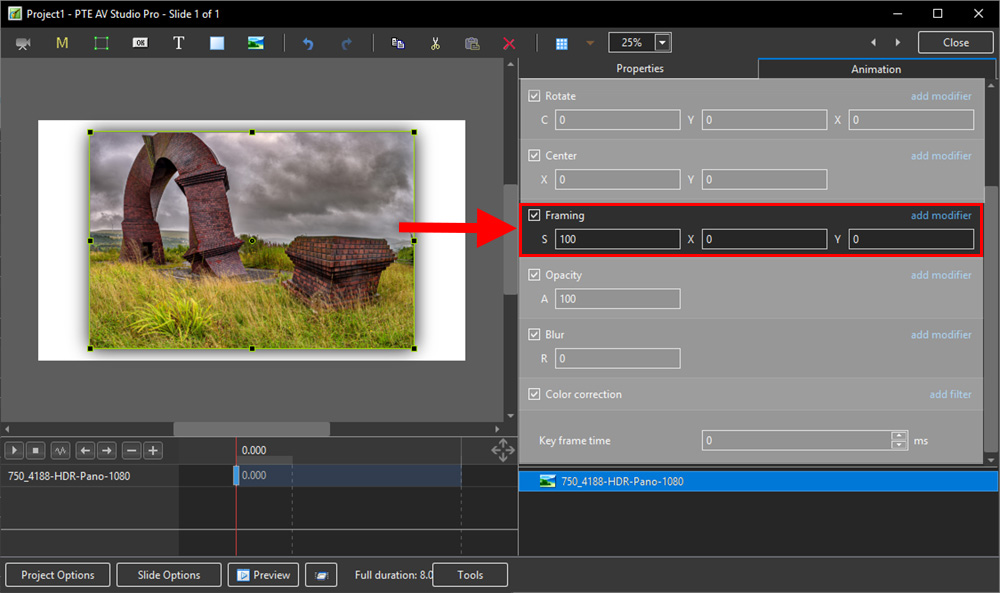
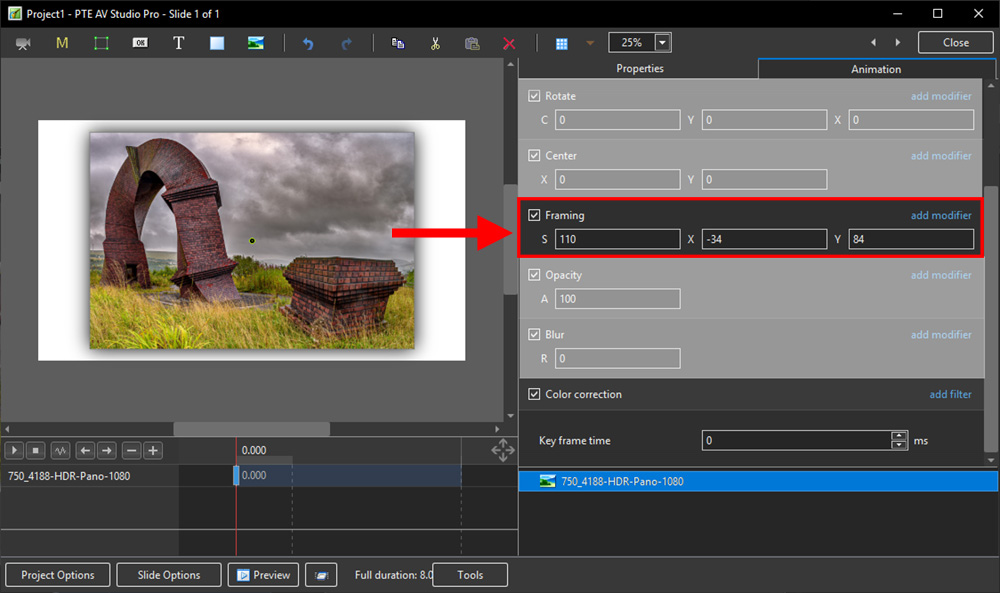
- Framing can be used to Pan and/or Zoom an Image within a Frame without modifying the frame itself
- Framing can also be used to adjust an Aspect Ratio mismatch
- In the example below a 4:3 image is shown within a 3:2 frame at 90% of full screen in a 16:9 Project.
- In the default 100% Scaling (S) the 4:3 Image has been "cut off" at the top and bottom of the Image and "Fits" the Width of the 3:2 Frame.
- By adjusting the "S", "X" and "Y" Controls a "Best Fit" composition can be achieved
- Further Panning and Zooming is possible
Opacity and Blur
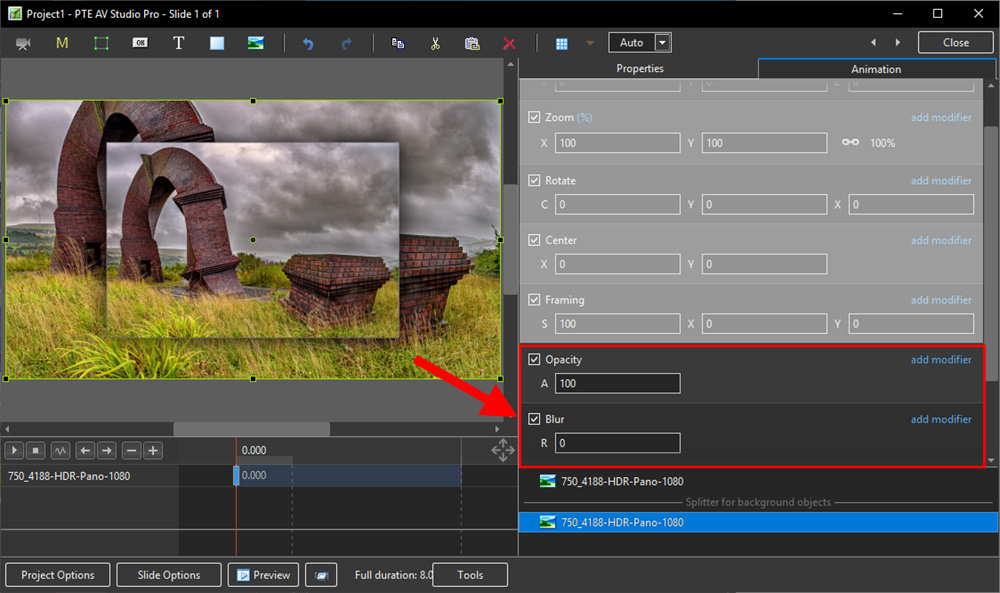
- The Illustration shows Main Image used as a Background Image at 100% Opacity and Zero Blur
- The following Illustration shows the same Background Image with reduced Opacity and a little Blur
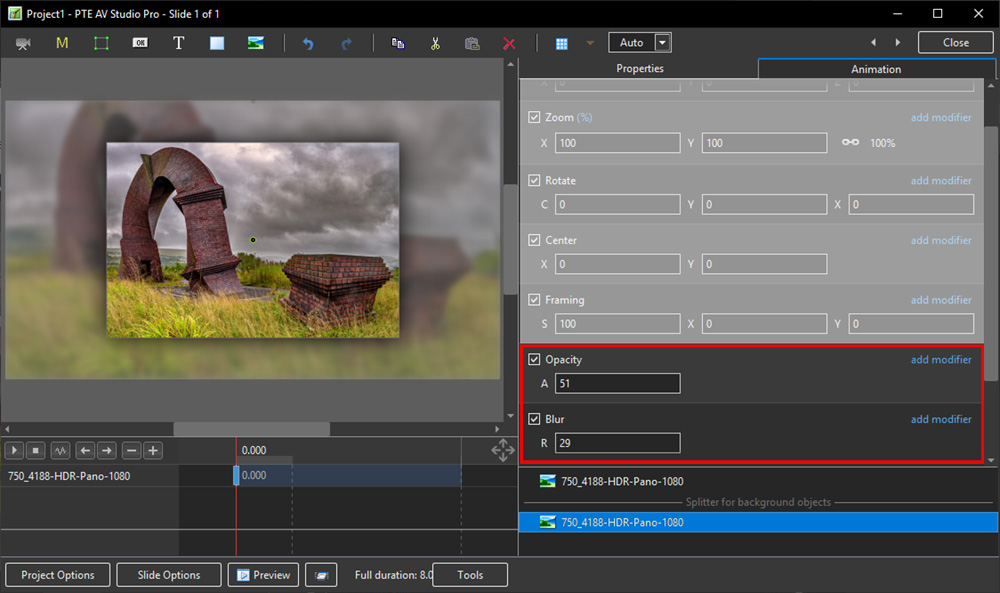
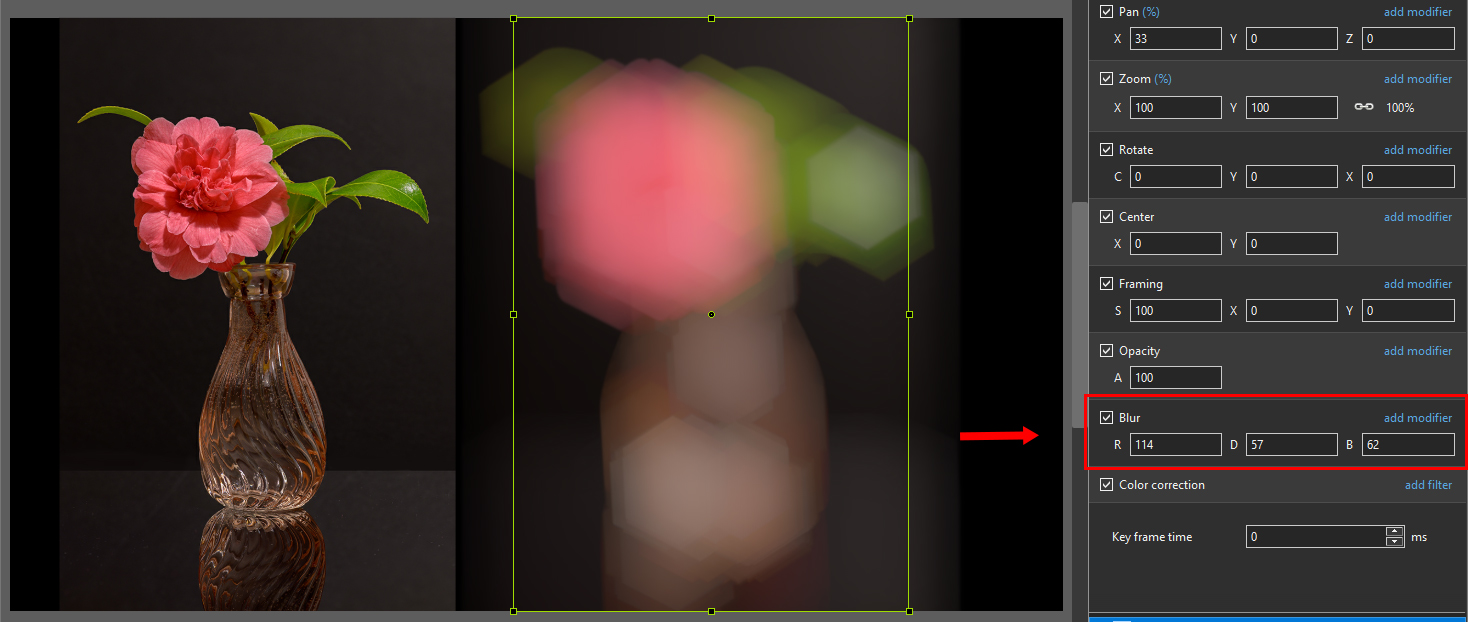
- Choosing Gauss Extended in Properties/Blur Mode prevents the vignetting effect which happens with Gauss Blur in a full screen image
- Additional controls are offered for Directional and Bokeh Blur Modes
- D controls the Direction of the Blur
- B controls the intensity of the Bokeh Blur
Modifiers
- Modifiers can be applied to an Animation of an Object / Image between two Key Frames
- The Modifier is applied to the first Key Fame of a pair of Key Frames defining the animation
- Click on "Add Modifier"
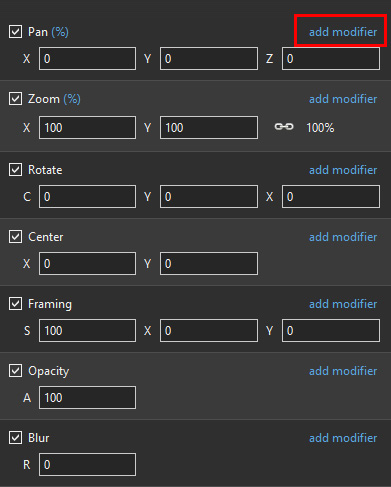
- The drop-down shows a number of options, the first being Animation Speed
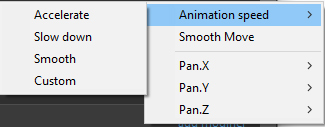
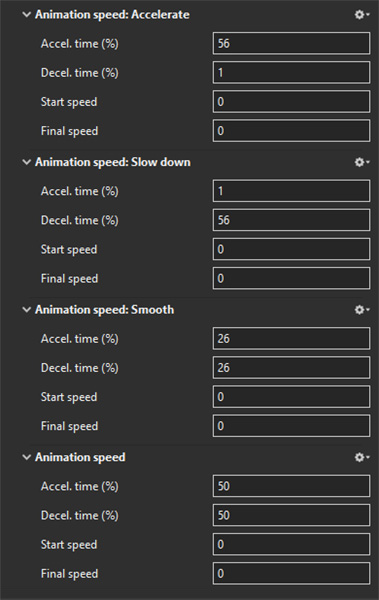
- Acceleration - the animation starts "slowly" and builds up to a maximum
- Slow Down - the animation starts at maximum speed and finishes smoothly
- Smooth - Starts an ends smoothly, with the maximum speed in the middle
- Custom - Linear Acceleration to the Middle of the animation and Linear Deceleration to the finish - a starting point for a Custom Setting
Smooth Move
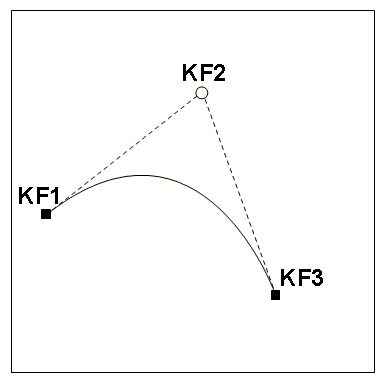
- To use the Smooth Move modifier it is necessary to have at least 3 keyframes and apply this modifier to the middle keyframe.
- It creates a Bezier curve for the motion.
Pan X; PanY; Pan Z
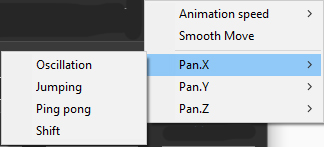
- Pan, Zoom, Rotate etc all have a set of modifiers labelled:
- Oscillation
- Jumping
- Ping Pong
- Shift
- The following Video demonstrates the various Modifiers
Colour Correction
- Click on "Add Filter" to display a list of available Colour Correction Adjustments:
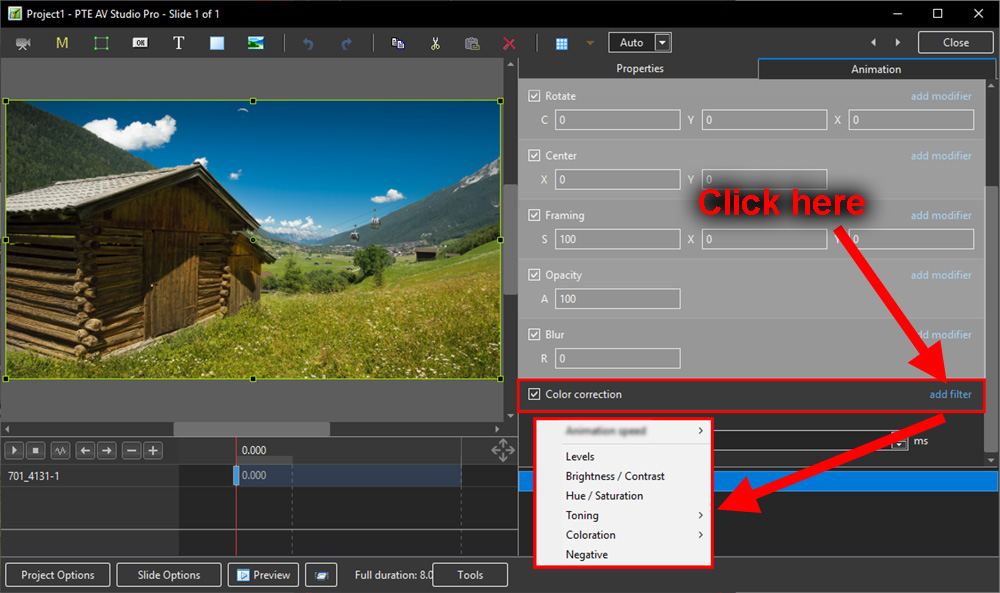
The available Adjustments are:
- Levels
- Brightness / Contrast
- Hue / Saturation
- Toning
- Colouration
- Negative
Levels
- The Adjustments:
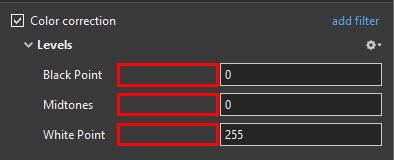
- Click and drag within the area outlined to the Left and / or Right to change the value of the adjustment
- Values can be entered directly via the keyboard
- Increasing the Black Point and decreasing he White Point will apply Contrast to the Object / Image
- Increasing / Decreasing the Midtones will Lighten / Darken the Object / Image
Brightness / Contrast
- The Adjustments:
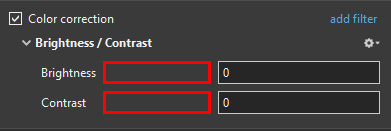
- Click and drag within the area outlined to the Left and / or Right to change the value of the adjustment
- Values can be entered directly via the keyboard
- Drag to the Left / Right to Decrease / Increase Brightness
- Drag to the Left / Right to Decrease / Increase Contrast
Hue / Saturation
- The Adjustments:
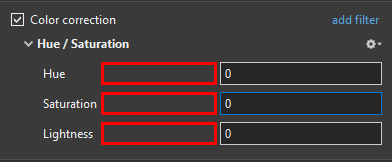
- Click and drag within the area outlined to the Left and / or Right to change the value of the adjustment
- Values can be entered directly via the keyboard
- Drag to the Left / Right to change the Hue
- Drag to the Left / Right to Desaturate / Saturate the Object / Image
- Drag to the Left / Right to Darken / Lighten the Object / Image
Toning
- The Adjustments:
- Choose from Grayscale, Sepia or Cyan
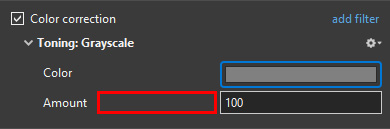
- Click and drag within the area outlined to the Left and / or Right to change the value of the adjustment
- Values can be entered directly via the keyboard
- Click on the Colour /Grayscale to open the Choose Colour Box and change the Tone
- Drag the Amount Slider to the Left to Decrease the Effect
Colouration
- The Adjustments:
- Choose from Red, Green or Blue
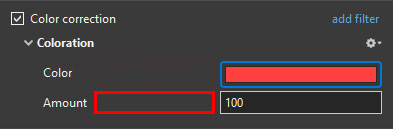
- Click and drag within the area outlined to the Left and / or Right to change the value of the adjustment
- Values can be entered directly via the keyboard
- Click on the Colour to open the Choose Colour Box and change the Tone
- Drag the Amount Slider to the Left to Decrease the Effect
Negative
- No Adjustments
- Creates a Negative version of the Object / Image
- Combine with Grayscale Toning or Desaturation to make a Black and White Negative from a Colour Image
- Can also be used for "Inverting a Mask" (with "Convert to Alpha Image" unticked)

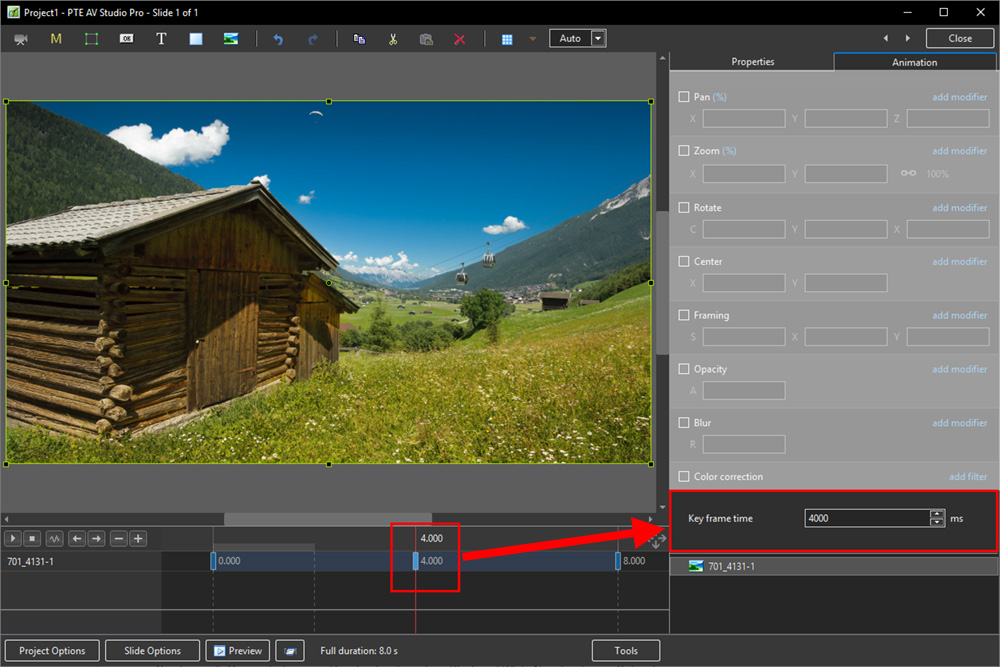
Key-frame Time
- Allows for precise positioning of Key-Frames
Colour Correction
- Click on "Add Filter" to display a list of available Colour Correction Adjustments:
The available Adjustments are:
- Levels
- Brightness / Contrast
- Hue / Saturation
- Toning
- Colouration
- Negative
Levels
- The Adjustments:
- Click and drag within the area outlined to the Left and / or Right to change the value of the adjustment
- Values can be entered directly via the keyboard
- Increasing the Black Point and decreasing he White Point will apply Contrast to the Object / Image
- Increasing / Decreasing the Midtones will Lighten / Darken the Object / Image
Brightness / Contrast
- The Adjustments:
- Click and drag within the area outlined to the Left and / or Right to change the value of the adjustment
- Values can be entered directly via the keyboard
- Drag to the Left / Right to Decrease / Increase Brightness
- Drag to the Left / Right to Decrease / Increase Contrast
Hue / Saturation
- The Adjustments:
- Click and drag within the area outlined to the Left and / or Right to change the value of the adjustment
- Values can be entered directly via the keyboard
- Drag to the Left / Right to change the Hue
- Drag to the Left / Right to Desaturate / Saturate the Object / Image
- Drag to the Left / Right to Darken / Lighten the Object / Image
Toning
- The Adjustments:
- Choose from Grayscale, Sepia or Cyan
- Click and drag within the area outlined to the Left and / or Right to change the value of the adjustment
- Values can be entered directly via the keyboard
- Click on the Colour /Grayscale to open the Choose Colour Box and change the Tone
- Drag the Amount Slider to the Left to Decrease the Effect
Colouration
- The Adjustments:
- Choose from Red, Green or Blue
- Click and drag within the area outlined to the Left and / or Right to change the value of the adjustment
- Values can be entered directly via the keyboard
- Click on the Colour to open the Choose Colour Box and change the Tone
- Drag the Amount Slider to the Left to Decrease the Effect
Negative
- No Adjustments
- Creates a Negative version of the Object / Image
- Combine with Grayscale Toning or Desaturation to make a Black and White Negative from a Colour Image
- Can also be used for "Inverting a Mask" (with "Convert to Alpha Image" unticked)
Key-frame Time
- Allows for precise positioning of Key-Frames